
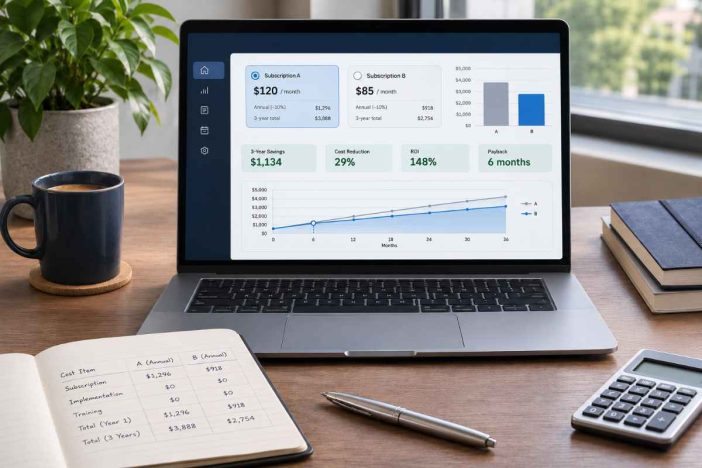
A software renewal arrives with an unwelcome price increase. Another vendor offers similar features at nearly half the monthly cost. The obvious decision seems to be switching.
Then someone asks who will move the data.
The team needs to rebuild automations. Existing reports must be checked. Employees will need time to learn the new interface, and both subscriptions may remain active while the transition is completed.
Suddenly, the cheaper plan is no longer such a straightforward bargain.
A useful comparison must account for the cost of leaving, not just the price of arriving. This calculator helps turn those less visible expenses into a practical estimate before you commit.
Free Software Switching Cost Calculator
Enter the monthly subscription costs of your current and replacement software, the time required for migration, training and setup, and any additional fees.
The calculator estimates your one-time transition expense, recurring savings, total costs over your selected period, first break-even month, and a more conservative scenario.
Software Switching Cost Calculator
Compare the cost of keeping your current software with migrating to a replacement. Include subscriptions, implementation work, retraining, and temporary disruption. Results update as you edit your assumptions.
All calculations run in your browser. No account or server submission is required. Illustrative values are provided so you can test the model; replace them before relying on the result.
1. Software and subscription costs
Enter full monthly costs, including seats and recurring add-ons. The model assumes the replacement starts at month 1, with old subscriptions retained for the overlap period.
2. Transition labor and expenses
Training and productivity-loss hours must be distinct to avoid double counting. Labor is valued for planning; it may not be an additional cash payment.
3. Uncertainty test
The stress scenario increases one-time labor and expenses and reduces positive recurring savings. It does not predict future prices or risk probabilities.
Comparison results
Total cost comparison
| Scenario | Keep current software | Switch to replacement | Difference (keep − switch) |
|---|
How to interpret the result
A positive net saving means the replacement costs less under your inputs. A negative number means keeping the current tool is cheaper for the selected period. A break-even month exists only if cumulative savings recover transition costs within the modeled horizon.
Decision safeguard: Do not use the lowest cost as an automatic recommendation. Check export completeness, security, required features, contract obligations, accessibility, and recovery options before migrating. Treat a close or stress-sensitive result as a reason to validate assumptions.
Calculation method
Keep cost: current monthly subscription × horizon. Switch cost: replacement monthly subscription × horizon + current subscription × overlap months + one-time transition cost. Net savings: keep cost − switch cost. The stress case applies your selected overrun to transition cost and reduces any positive monthly savings by the selected shortfall percentage.
This is an editable scenario estimate, not a vendor quote, financial recommendation, or empirical forecast. No data is transmitted by this tool. The model assumes stable monthly subscription prices and charges transition expenses at the start.
The results are planning estimates, not guarantees. If you are unsure about a cost, use a reasonable provisional figure and revisit it after obtaining the relevant vendor information.
How to Use the Software Switching Cost Calculator
You do not need an account or a spreadsheet. The calculator runs in your browser and updates the comparison as you change your assumptions.
1. Compare your current and replacement subscriptions
Enter the names of both software products and their total monthly subscription expenses in US dollars.
Use the amount you actually expect to pay, including applicable user seats and recurring add-ons. Comparing a fully configured current subscription with an entry-level replacement plan would understate the replacement’s cost.
Choose a comparison period of 12, 24, 36, or 60 months.
Then enter the number of months you expect to pay for both systems during migration. For example, a one-month overlap means keeping the old subscription active while the replacement is already running.
2. Estimate the work required to switch
The second section asks for several types of transition effort:
- Data migration: Hours spent exporting, cleaning, checking, and importing records.
- Workflow rebuilding: Time needed to recreate integrations, automations, settings, and reporting processes.
- Training: Number of people requiring training and the estimated hours per person.
- Labor value: An hourly estimate for the time devoted to the transition.
- Implementation and cancellation fees: Additional charges from vendors or external service providers.
- Productivity loss: Working hours lost beyond the migration and training activities already counted.
- Other one-time costs: Relevant expenses not covered by the other inputs.
Avoid counting the same working hour twice. If an employee spends three hours attending training, do not automatically add those same three hours again under productivity loss.
Internal staff hours may represent an opportunity cost rather than an additional cash payment. That distinction matters when comparing budget impact with the broader economic cost of a transition.
3. Test the uncertainty in your estimate
Software migrations rarely follow every assumption perfectly.
The calculator lets you model two unfavorable changes: a percentage increase in transition costs and a percentage reduction in expected positive monthly subscription savings.
For example, you can test what happens if implementation becomes 25% more expensive and recurring savings are 20% lower than anticipated.
This is a sensitivity test, not a probability-based forecast.
4. Review, copy, download, or print your results
The results appear as you edit the inputs.
You can use Load example to explore the calculator, Clear to zero to begin a new estimate, or Copy summary to preserve the current results.
The Download CSV button exports a summary for spreadsheet review. Print results opens a printable report rather than requiring you to print the entire article.
Before using an estimate for a business decision, verify the underlying costs independently.
What Does Switching Software Actually Cost?
The subscription difference is only one part of the financial picture.
A platform migration can involve several separate cost categories, some of which appear on invoices while others consume internal working capacity.
| Cost category | What to include | Why it matters |
|---|---|---|
| Replacement subscription | Monthly plan, seats, recurring add-ons | Determines the ongoing expense |
| Parallel subscriptions | Old software retained during migration | Creates a temporary double payment |
| Data migration | Export, cleanup, import, validation | Requires work even when the transfer is automated |
| Workflow rebuilding | Integrations, automations, reports | Existing processes may not transfer directly |
| Training | Time required to learn new workflows | Reduces time available for regular work |
| Productivity disruption | Additional time lost during adjustment | Can delay normal operations |
| External fees | Setup, consulting, cancellation | Adds direct monetary expenses |
The US Department of Defense’s open-source software evaluation guidance emphasizes that total cost of ownership includes more than the acquisition price. Installation, support, upgrades, and transition expenses also need consideration over a comparable period.
That principle applies just as well to commercial subscription software.
Subscription savings are not the same as migration savings
Suppose your current software costs $180 per month, while a replacement costs $95.
The difference is $85 per month.
Over two years, that creates $2,040 in potential subscription savings before migration expenses and any period of overlapping subscriptions.
If the transition costs more than those savings, changing software may not reduce your overall modeled cost within those two years.
The overlap period changes the economics
An overlooked expense is paying for two products at the same time.
You may need to preserve access to the original system for checking imported data, completing existing work, or meeting a contractual obligation.
In this calculator, the old subscription is charged for the stated overlap months in addition to the replacement subscription. The overlap is limited to the selected comparison period.
The model assumes the replacement begins at month one and does not attempt to prorate individual billing dates.
Worked Example: A Cheaper App With a Delayed Payback
Consider a small team planning to replace an existing software subscription.
The current service costs $180 per month. The replacement costs $95. The team expects one month of parallel subscriptions, some migration and training work, and a two-year evaluation period.
These are illustrative figures, not observations from a real customer migration.
Example inputs
| Input | Assumption |
|---|---|
| Current monthly subscription | $180 |
| Replacement monthly subscription | $95 |
| Comparison period | 24 months |
| Subscription overlap | 1 month |
| Data migration | 12 hours |
| Workflow rebuilding | 8 hours |
| Training | 3 people × 3 hours |
| Additional productivity loss | 6 team-hours |
| Hourly labor value | $35 |
| External fees | $100 |
| Other costs | $0 |
The combined transition effort is 35 hours. At $35 per hour, that represents $1,225 of labor value, plus $100 in fees.
The total one-time transition estimate is therefore $1,325.
What the calculator shows
| Result | Estimate |
|---|---|
| One-time transition cost | $1,325 |
| Monthly recurring savings | $85 |
| Cost of keeping the current software for 24 months | $4,320 |
| Cost of switching over 24 months | $3,785 |
| Net savings over 24 months | $535 |
| First break-even month | Month 18 |
| Stress-case net savings | −$204.25 |
The replacement is cheaper over the selected 24-month period under the original assumptions.
But there is an important qualification: the modeled savings take 18 months to recover the transition costs.
A business expecting to change platforms again within a year would see a different financial picture. At 12 months, the example produces a net cost disadvantage of $485 for switching.
The stress scenario is equally revealing.
With a 25% transition-cost overrun and 20% lower positive monthly savings, the original $535 advantage turns into a modeled $204.25 disadvantage.
The decision is not automatically wrong. It is simply less robust than the subscription price alone suggests.
How the Calculator Estimates Break-Even Time
The calculation compares two alternatives over the same period: keeping the current software or switching to the replacement.
Keep cost = Current monthly subscription × Comparison months
Switch cost = Replacement monthly subscription × Comparison months + Old subscription × Overlap months + One-time transition cost
Net savings = Keep cost − Switch cost
Positive net savings mean switching is less expensive under the entered assumptions. Negative net savings mean the current software is less expensive over the selected period.
The calculator checks each whole month within the selected horizon to identify the first month when cumulative savings recover the modeled switching expenses.
It is therefore possible to have a cheaper replacement subscription without reaching break-even during the comparison period.
What the stress case changes
The stress calculation increases the estimated one-time transition cost and reduces positive recurring savings.
It is useful for identifying decisions that depend heavily on optimistic assumptions.
However, it does not model every possible problem, assign probabilities, or account for benefits such as improved customer service, better reporting, stronger security, or faster operations.
For those considerations, pair the financial comparison with a structured decision scorecard for choosing tools and systems. A low-cost product can still be a poor operational choice.
When Switching Software May Not Be Worth It
The calculator helps reveal situations where a replacement needs closer examination.
The migration takes longer than the subscription savings can recover
If a replacement saves $20 per month but requires substantial rebuilding, the payback period may extend beyond the software’s expected useful life.
The same concern applies when a business frequently changes tools. Repeated migrations can consume savings that never have time to accumulate.
Important workflows cannot be transferred reliably
A CRM may export contact records without preserving every automation, custom relationship, activity history, or reporting configuration.
A project management platform might transfer tasks but require substantial manual work to reconstruct permissions and dependencies.
Before budgeting migration hours, establish what the destination software can actually import.
The team has little capacity for retraining
A transition scheduled during a critical project or busy sales period can create disruption beyond the subscription cost.
A lower-priced system may be worth adopting eventually, but the timing could still be wrong.
The replacement introduces new dependencies
Some platforms need extra integrations, premium features, additional user seats, or a higher subscription tier to match an existing workflow.
Evaluate the complete intended setup rather than the advertised starting price.
Summase.org’s productivity tool testing methodology examines switching friction, maintenance burden, and workflow coherence alongside feature availability. Those factors provide useful context when the calculator’s financial result is close.
A Pre-Switch Verification Checklist
Check each item as you verify your software switching assumptions. This checklist helps identify hidden costs, migration risks, and missing information before you commit to a replacement.
1. Confirm the contract
2. Test the migration
3. Validate the operating impact
4. Recheck the decision
Planning note: Your selections remain in the current page session and may reset when the page is refreshed. This checklist does not submit or store your answers on a server. It supports preliminary evaluation and does not replace technical due diligence.
The checklist is not a substitute for a technical migration plan. It helps identify missing assumptions before an apparently attractive subscription price becomes a purchasing decision.
Three Decision Paths After You Calculate
A switching-cost estimate should inform the next action, not merely produce a positive or negative number.
Path A: Switch after validation
The replacement meets your essential requirements, the migration has been tested, the expected payback fits your planning horizon, and the financial result remains acceptable under less favorable assumptions.
Proceed with a controlled transition rather than cancelling the existing service immediately.
Path B: Improve the current system first
The new subscription is cheaper, but implementation work consumes most of the expected savings.
Check whether renegotiating the existing contract, reducing unused seats, removing unnecessary add-ons, or simplifying workflows could improve the current system at a lower cost.
Path C: Delay the decision and gather evidence
The financial result is close to break-even, data migration is uncertain, or the stress scenario reverses the savings.
Run a limited pilot, request a detailed implementation estimate, or test data portability before making the final decision.
This approach fits the broader Decision Efficiency System: define the decision, establish rules, test assumptions, and review outcomes instead of repeatedly reconsidering the same options without new evidence.
What This Calculator Does Not Measure
This is a simplified comparison model designed for early-stage planning.
It assumes stable monthly subscription costs and places one-time transition expenses at the beginning of the modeled period.
It does not automatically calculate:
- Taxes, inflation, exchange rates, or the time value of money.
- Different annual billing schedules and prorated refunds.
- Future usage-based pricing, seat growth, or price increases.
- Differences in ongoing support and maintenance costs unless incorporated into the supplied estimates.
- Quantified revenue gains or productivity improvements from a better platform.
- Security incidents, regulatory consequences, or operational downtime beyond the user-entered disruption estimate.
- The probability of migration failure.
For complex or high-value projects, a more detailed total cost of ownership model and discounted cash-flow assessment may be appropriate.
The US Federal Reserve’s software accounting guidance also illustrates why implementation, training, data conversion, and other software-related costs may require different accounting treatment. This calculator treats labor as an economic planning input; its figures should not automatically be treated as recognized expenses or cash outflows.
For consequential purchasing, accounting, or contractual decisions, verify the numbers with the appropriate technical, financial, and legal professionals.
Frequently Asked Questions
Is software migration cost the same as the new subscription price?
No. Migration cost covers work and expenses associated with changing systems, including moving data, rebuilding workflows, training staff, and managing disruption. The subscription price is the recurring charge for using the replacement. Both affect total switching cost, but they represent different kinds of expense.
What if the replacement software costs more per month?
The calculator can still compare the alternatives, but higher recurring costs will generally make switching less attractive financially. A more expensive replacement might deliver operational or security benefits that justify the difference. Those benefits require separate evaluation because the calculator does not automatically monetize them.
Can I use the calculator for CRM or project management software?
Yes. The model can support comparisons involving CRM systems, project management platforms, note-taking applications, collaboration software, and other subscriptions. Enter the costs associated with your particular migration. For complex enterprise systems, supplement the estimate with vendor-specific technical assessments and financial analysis.
Does the calculator save or upload my business information?
The calculator’s stated design performs calculations locally in the browser without submitting form values to a server. It does not provide a saved-account history. Avoid entering confidential information unnecessarily, and remember that the hosting website may use separate analytics or advertising services.
Make the Software Decision Before Paying the Switching Cost
A lower monthly price is a reason to investigate a replacement, not sufficient evidence that changing software will save money.
Use the software switching cost calculator to establish the likely transition expense, the time required to recover that cost, and how sensitive the estimate is to uncertainty.
Then check the factors the calculation cannot decide for you: data portability, operational fit, contractual obligations, and the ability to recover if the migration fails.
For more guidance on connecting tools with durable workflows, explore Summase.org’s Technology for Productivity & Decision Efficiency hub.
The best software decision is not necessarily the cheapest subscription. It is the option whose costs, capabilities, and risks fit the work you actually need to do.