
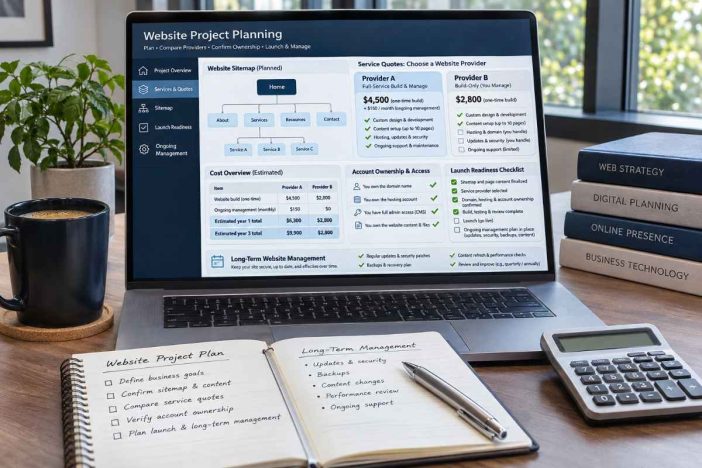
A website quote can look straightforward until you ask three questions: Who controls the domain? What exactly happens after launch? And what will the website cost to keep running next year?
Those questions matter because two websites with similar designs can come with very different obligations. One may be easy to update, transfer, and maintain. The other may depend on a provider for every small change.
For small-business owners, the challenge is rarely finding someone who can build a website. It is choosing the right combination of website services without paying for unnecessary complexity or overlooking responsibilities that become expensive later.
This website services for small businesses guide is designed to help you make those decisions before signing a contract, choosing a platform, or committing to ongoing support.
Whether you are creating your first business website, launching a focused landing page, or improving an existing WordPress site, the goal is the same: build something useful, manageable, and appropriate for your business.
What Website Services Does a Small Business Actually Need?
Website services cover more than design and development. Depending on the project, they may include planning, platform configuration, content preparation, technical setup, search readiness, ongoing maintenance, and support.
The important distinction is between services needed before launch, services required at launch, and responsibilities that continue after launch.
| Service | Main purpose | When to consider it |
|---|---|---|
| Website planning | Define the audience, pages, features, and business goal | Before requesting quotes |
| Website development | Build the pages, navigation, forms, and website functionality | New site or substantial rebuild |
| WordPress setup | Configure the CMS, theme, menus, and essential settings | WordPress-based projects |
| Landing page creation | Support one campaign, offer, or conversion objective | Product launches or lead generation |
| Website copywriting | Explain the business and guide visitors toward action | New pages or unclear messaging |
| Basic SEO setup | Prepare titles, structure, sitemap, and search foundations | Before or during launch |
| Website maintenance | Keep software, backups, and operational checks managed | After launch |
| Content development | Publish useful resources and support relevant search topics | Ongoing audience development |
You may need several of these services, but that does not mean you should purchase everything simultaneously.
The first decision is what the website must accomplish—not which package looks most impressive.
Choose the Smallest Website That Can Do the Job
A business with one main service and a limited marketing budget may not need the same architecture as a publisher maintaining hundreds of articles or a retailer processing customer orders.
A focused landing page
A landing page is appropriate when the visitor arrives with a specific purpose.
For example, a consultant promoting one workshop may need a page explaining the audience, schedule, benefits, registration process, and next step.
A focused page can be sufficient for that campaign without requiring a large website.
Explore the Landing Page Creation Service if your immediate objective is to promote an offer, generate inquiries, or support a specific campaign.
A small business website
A service business usually needs more context than a single landing page provides.
Potential clients may want to check your background, understand different services, review your process, and find reliable contact information.
A practical starting structure often includes:
- Homepage with a clear business proposition.
- About page with relevant background and credibility.
- Individual service pages when offerings differ meaningfully.
- Contact page with working inquiry options.
- Privacy information and other applicable legal disclosures.
Additional pages should solve genuine visitor needs rather than increase the page count for appearance.
For businesses preparing a complete online presence, the Website Creation Service explains an available approach to website structure, setup, and project delivery.
A content-driven website
A publication, professional resource site, or educational business has different requirements.
It needs consistent navigation, appropriate categories, readable article templates, and a content structure that can expand without becoming confusing.
Publishing a large number of articles is not automatically a growth strategy. Each new article should serve a distinct reader need and have a logical place within the website.
An ecommerce or custom-function website
Online stores, membership platforms, booking systems, and custom web applications require additional planning.
Payments, customer accounts, integrations, inventory, access permissions, and data handling can materially change development and maintenance requirements.
Avoid treating a transaction-based website as an ordinary brochure site with a few additional buttons.
Write a Website Project Brief Before Comparing Providers
A vague request such as “I need a professional website” leaves too many important decisions to the person preparing the quote.
One developer may assume that you already have all the text and images. Another may include content preparation. A third may quote for design but exclude technical maintenance.
Each may be offering a legitimate service, but the proposals are not directly comparable.
Define the business outcome
Start with the action you want visitors to take.
Examples include requesting a quote, booking a consultation, calling your business, registering for an event, or finding reliable information about your services.
Choose one primary outcome for each important page. Secondary actions can still exist, but they should not obscure the main path.
Define the website scope
A useful project brief should identify:
- The audience and target countries or service areas.
- The proposed website type and expected number of pages.
- The content, photographs, and brand materials already available.
- Required functionality, such as contact forms, bookings, or payments.
- The preferred platform, if one has already been selected.
- Accessibility, mobile usability, and basic SEO requirements.
- The proposed launch date and review responsibilities.
- Any current website, hosting account, or domain to be reused.
If information is missing, identify it as an open decision rather than silently assuming it is included.
Example: a practical brief for a small consultancy
Business goal: Generate qualified consultation inquiries.
Primary audience: Small businesses seeking operational advice.
Proposed pages: Home, About, Services, individual service details, Contact, and appropriate legal pages.
Essential functions: Mobile navigation, inquiry form, email notification, and basic analytics subject to applicable privacy requirements.
Content responsibility: The client supplies business facts and credentials; the agreed copywriting service prepares the final page text.
Handover requirement: Client-controlled domain and hosting arrangements, documented website access, and clear instructions for routine editing.
This short brief gives different providers a more consistent foundation for estimating the work.
Compare Website Quotes Using Total Cost of Ownership
The lowest initial website quote is not necessarily the lowest-cost choice over time.
Some providers charge a larger build fee and a relatively small annual amount. Others reduce the setup price but require recurring subscriptions, paid add-ons, or ongoing support.
Neither structure is automatically better.
Separate one-time and recurring expenses
Ask each provider to identify:
| Cost category | Questions to ask |
|---|---|
| Initial development | Which pages, functions, revisions, and testing are included? |
| Domain registration | Who controls the registrar account, and what is the renewal cost? |
| Hosting | What plan is included, and who manages the account? |
| Premium software | Which themes, plugins, and subscriptions require renewal? |
| Maintenance | Are updates, backups, monitoring, and restoration covered? |
| Content changes | How many edits are included, and what costs extra? |
| Technical support | What support hours and response terms are offered? |
| Exit or migration | What would it take to transfer the website elsewhere? |
For the first year, a simple planning formula is:
First-year cost = Initial build + first-year subscriptions + hosting + maintenance + expected additional work.
For subsequent years:
Annual operating cost = Renewals + hosting + maintenance + expected additional work.
These figures should be adjusted for your actual business, currency, applicable taxes, and contract terms.
Example: why the second year changes the comparison
The figures below are hypothetical. They demonstrate how to compare quotes, not typical market prices.
| Cost | Provider A | Provider B |
|---|---|---|
| Initial website build | $900 | $1,500 |
| Annual hosting | $220 | $200 |
| Annual software licenses | $120 | $0 |
| Annual maintenance | $600 | $300 |
| First-year total | $1,840 | $2,000 |
| Second-year cost | $940 | $500 |
| Two-year total | $2,780 | $2,500 |
Provider A looks cheaper initially. Under these assumptions, Provider B becomes cheaper over two years.
That does not automatically make Provider B the better choice. You would still need to compare the work included, maintenance quality, ownership terms, and technical limitations.
The broader lesson is that a website budget should cover the period you intend to operate the site, not just the day it goes live.
WordPress, Website Builders, or Custom Development?
Platform selection affects editing, maintenance, compatibility, costs, and the ability to change providers later.
When WordPress makes sense
WordPress can be appropriate for business websites, blogs, service pages, and content-heavy projects that need an established content management system.
Its flexibility comes with maintenance responsibilities. Themes, plugins, user permissions, backups, and updates must be managed.
If you already have hosting or want assistance configuring WordPress, see the WordPress Website Setup Service.
When a hosted website builder makes sense
Hosted builders can be practical when the site is relatively simple and the owner prefers an integrated system for editing, hosting, and publishing.
However, confirm whether the chosen platform supports the required functionality and how much of the site can be exported if you leave.
A convenient editing experience does not necessarily mean unrestricted migration.
When custom development is justified
Custom development may be appropriate when a business needs specialized workflows, complex integrations, or functionality that cannot be implemented efficiently through an existing platform.
Before approving this approach, ask who will maintain the code, where the source files will be stored, and what documentation another developer would need.
A good platform decision is based on requirements, operating costs, and exit options—not popularity alone.
Plan Website Content and Conversion Paths Together
A technically functional website can still fail to communicate its value.
Visitors should be able to answer a few basic questions without extensive searching: What does this business offer? Is it relevant to me? Why should I trust the information? What should I do next?
Make every important page useful
A homepage should orient visitors, while service pages should explain specific offers.
For a professional service, a useful page normally includes the audience, the problem being addressed, the service scope, the process, important limitations, and a relevant next step.
Avoid filling pages with repeated claims that do not explain anything concrete.
For support with page messaging, the Website Copywriting Service covers content for homepages, service pages, pricing pages, and other website sections.
Match the page to the visitor’s intention
Someone researching your business may need background and credibility information.
Someone arriving from a campaign may need a specific offer and a direct registration or contact option.
Someone comparing services may need pricing explanations, scope boundaries, FAQs, and contact details.
Different visitor intentions can justify different pages, but they should still feel like parts of one coherent website.
Treat contact forms as operational tools
A form that looks professional but never delivers an inquiry is not ready for launch.
Test the submission process, notifications, error messages, mobile layout, and confirmation message.
Only collect information necessary for the stated purpose, and explain how submitted data will be handled.
Prepare the Website for Search Without Promising Rankings
Basic SEO is part of a sound website foundation, but it should not be confused with guaranteed search traffic.
Google’s guidance emphasizes useful content, understandable site structure, appropriate linking, and a satisfying page experience.
Search engines make their own crawling, indexing, and ranking decisions.
A sensible starting SEO scope
For a new small-business website, the initial review should cover descriptive titles, clear headings, relevant page text, logical URLs, internal navigation, sitemap readiness, and important indexing settings.
Also check that the website is not accidentally blocked from search indexing.
The Basic Website SEO Setup Service explains the available scope for preparing these elements on selected pages.
Add educational content when it has a purpose
A service business does not need a blog simply because other businesses have one.
Educational content becomes useful when it answers questions your prospective customers genuinely ask, explains decisions, or clarifies how your services work.
For example, a website maintenance provider could publish a practical comparison of backup responsibilities and recovery procedures instead of producing repetitive articles around the same keyword.
If developing a publication or service-supporting content library is part of your plan, explore the SEO Article Writing Service.
Website Project Readiness Checklist
Before approving a proposal, use the following checklist to identify decisions that still need attention.
A successful project does not require every optional feature to be completed in advance. It does require clarity about what has been decided, what remains open, and who is responsible.
The interactive checklist allows you to mark completed items, review your progress, and copy a summary to discuss with a provider.
Website Project Readiness Tracker
Select what you have already clarified. Copy the results to see which questions still need answers before you approve a website proposal. Selections are processed in your browser and are not submitted to Summase.org.
Goals and scope
Content and technology
Budget and ownership
Launch and aftercare
Confirm Website Ownership Before the Build Starts
Website ownership should be discussed before final payment, not only when a business decides to change developers.
The most important distinction is between owning an account or asset and having temporary access to it.
For example, an administrator login may let you edit WordPress pages without giving you control of the domain registration or hosting account.
Domain, hosting, and website access
Clarify who is named as the domain registrant, who controls the registrar login, where the website is hosted, and which administrative accounts belong to the client.
For a business website, client-controlled accounts generally reduce the risk of losing access when a working relationship changes.
The practical requirement is documented ownership and access arrangements consistent with the signed agreement.
Source files, content, and licenses
Clarify the treatment of design assets, written content, custom code, website data, and third-party software licenses.
Not every third-party license is transferable. Some website components may remain subject to a provider’s subscription or licensing terms.
These restrictions should be understood before they become operational dependencies.
Website handover documentation
Ask for a usable handover record covering the website platform, important accounts, key integrations, routine editing instructions, backup procedures, renewal responsibilities, and support contacts.
Passwords should be shared through an appropriate secure method rather than placed in an ordinary handover document.
A website is easier to maintain when another authorized professional can understand its essential configuration without reconstructing the project from scratch.
Test the Website Before Calling It Finished
Launch readiness is not established by a homepage screenshot.
A website should be tested through the actions that matter to its visitors and operators.
Visitor-facing checks
Confirm that important pages open correctly on mobile and desktop, navigation behaves as expected, contact information is accurate, and the primary calls to action lead to the correct destination.
Test forms from submission through successful receipt. Review the wording of error messages and confirmation states.
Technical and accessibility checks
Review HTTPS, basic security settings, important redirects, sitemap access, page titles, image alternatives, and the ability to use important controls through a keyboard.
Where relevant, test loading responsiveness and layout stability using tools such as PageSpeed Insights.
Google’s Core Web Vitals focus on loading performance, interaction responsiveness, and visual stability. These metrics are useful diagnostics, not substitutes for checking the real customer journey.
Operational checks
Confirm that backup procedures are documented, restoration responsibilities are assigned, software licenses are understood, and essential administrators can access the appropriate systems.
For customer-facing functions, the party responsible for ongoing support should be identified before the project is signed off.
Website Maintenance Is an Operating Responsibility
Once a website launches, it becomes part of the business’s ongoing operations.
Domains and hosting must be renewed. Software may require updates. Contact details can change. Forms, integrations, and external services can stop behaving as expected.
For a WordPress website, maintenance may include:
- Reviewing core, theme, and plugin updates.
- Preparing backups before significant changes.
- Testing whether backups can actually be restored.
- Monitoring forms, critical pages, and unusual errors.
- Reviewing user permissions and inactive accounts.
- Checking renewals, dependencies, and essential integrations.
Not every business needs a comprehensive monthly service contract. A relatively simple site may be manageable by an informed owner.
However, if a website processes orders, supports bookings, or is important to business revenue, the consequences of downtime may justify more formal support.
When comparing maintenance packages, ask what work is performed, how often, how it is documented, and what is excluded.
When Should You Improve an Existing Website Instead of Rebuilding It?
A dated appearance does not always justify starting again.
If the platform is supportable, the content is valuable, and most functionality works, a focused improvement may be the more economical decision.
Consider improving the existing website when the problems are limited to unclear navigation, outdated copy, poor mobile presentation, missing SEO fundamentals, or individual features that can be repaired.
A rebuild becomes more reasonable when important technical dependencies are unsupported, major requirements cannot be met, or the cost and risk of repeated fixes outweigh a properly scoped replacement.
Before deciding, request a review that separates:
Keep: useful content, working features, established URLs, and other assets worth preserving.
Repair: elements with a defined technical or editorial problem.
Replace: components that are no longer practical to maintain or cannot meet essential requirements.
For established websites, preserve relevant URLs and plan migrations carefully. Changing a website’s design does not automatically require changing its entire URL structure.
How to Evaluate a Website Service Provider
A useful provider evaluation goes beyond portfolio appearance and promotional claims.
Look for a clear explanation of what will be delivered, what you must supply, how revisions work, and what happens if the project changes.
Ask comparable questions
Request written answers to the same set of questions from each provider:
- What exactly is included in the agreed price?
- Who prepares the content and supplies the images?
- Which functions will be tested before handover?
- What are the domain, hosting, and software renewal costs?
- Who controls the website and related accounts?
- How are changes, delays, and additional requirements handled?
- What support is available after launch?
- What information and files will be provided at handover?
A provider may have perfectly reasonable limitations. The concern is not the existence of limitations, but whether they are disclosed and understood.
Watch for unclear commitments
Be cautious about a proposal that promises search rankings, unlimited changes without defining the scope, permanent maintenance without explaining what it includes, or complete ownership without identifying the relevant assets.
Ask for clarification before committing funds.
A specific answer is more useful than a reassuring but unenforceable promise.
Explore Website and Digital Services at Summase.org
Once you understand your requirements, you can explore relevant services without committing to an unnecessarily broad project.
Summase.org has dedicated English-language service pages covering website creation, WordPress setup, landing pages, website copywriting, basic SEO configuration, and SEO article writing.
These services can be considered individually or discussed together where the project requires more than one type of work.
For the wider service catalog, visit Our Services. If you have a specific project brief or a question about scope, you can also use the Summase.org contact page.
Frequently Asked Questions About Website Services for Small Businesses
What website services should a small business start with?
Start by defining the website’s primary goal. A simple service business may initially need website planning, a small set of clear pages, working contact options, and basic technical setup. More advanced functions should be justified by actual business requirements.
Is a landing page enough for a small business?
It can be enough for a specific offer or campaign. A broader business website is more suitable when visitors need multiple services, business background, supporting information, and several ways to navigate the site.
Is WordPress suitable for a small-business website?
WordPress can be suitable for business websites, blogs, service pages, and growing content libraries. The decision should account for hosting, technical management, maintenance, and the owner’s editing needs.
How much should a small-business website cost?
There is no single appropriate price. Costs depend on page count, functionality, design requirements, content preparation, platform, maintenance, and ongoing subscriptions. Compare written scopes and total costs rather than relying on a headline quote.
Should domain and hosting be managed by the business?
Client-controlled arrangements are generally preferable when feasible because they make access and future provider changes easier to manage. The exact ownership, administrative permissions, and contractual responsibilities should be documented.
Does a new website need SEO before launch?
Basic search readiness is worth addressing before launch. This includes descriptive page information, navigable structure, appropriate indexing settings, and relevant content. It does not guarantee rankings or traffic.
How often should a business website be maintained?
Maintenance frequency depends on the platform, complexity, integrations, and risk. A WordPress website may require regular update reviews and backup checks, while a simpler hosted website may have fewer technical tasks for its owner.
Should I rebuild my website if it is not getting leads?
Not necessarily. Weak inquiry performance may reflect unclear messaging, poor traffic relevance, inaccessible contact options, or an unsuitable offer. Investigate the problem before replacing the entire site.
Make the Website Decision Before Making the Website Purchase
The purpose of choosing website services is not to purchase the largest project your budget allows.
It is to establish a website that fits your business, communicates effectively, remains manageable, and can adapt when your needs change.
Define the goal. Compare comparable scopes. Understand the recurring costs. Confirm ownership. Test the important functions. Decide who is responsible after launch.
Those decisions often matter long after the original design is forgotten.
Have a website project in mind? Review the available global services or contact Summase.org with your website goal, existing setup, and expected requirements.
Sources and Editorial Notes
This guide is an educational decision framework. It is not a quotation, legal opinion, security certification, or guarantee of search performance. The illustrative cost comparison is not a survey of market pricing.
External technical references:
- Google Search Central — Creating Helpful, Reliable, People-First Content
- Google Search Central — Sitemaps Overview
- WordPress Documentation — Updating WordPress
- W3C Web Accessibility Initiative — Forms Tutorial
- web.dev — Core Web Vitals
Editorial approach: Website services are evaluated through project scope, business relevance, ongoing costs, account control, operational risk, and handover readiness. Actual service terms should always be confirmed against the applicable provider agreement.